How to Reset Your Garage Door Opener (And Why You Should)
Whether you've just moved into a new home or simply want to ensure no unauthorized remotes can open your garage, resetting your garage door opener is a quick security win. In this guide, we'll show you how to reprogram remotes and clear old codes—plus explain why older openers might be putting your home at risk.
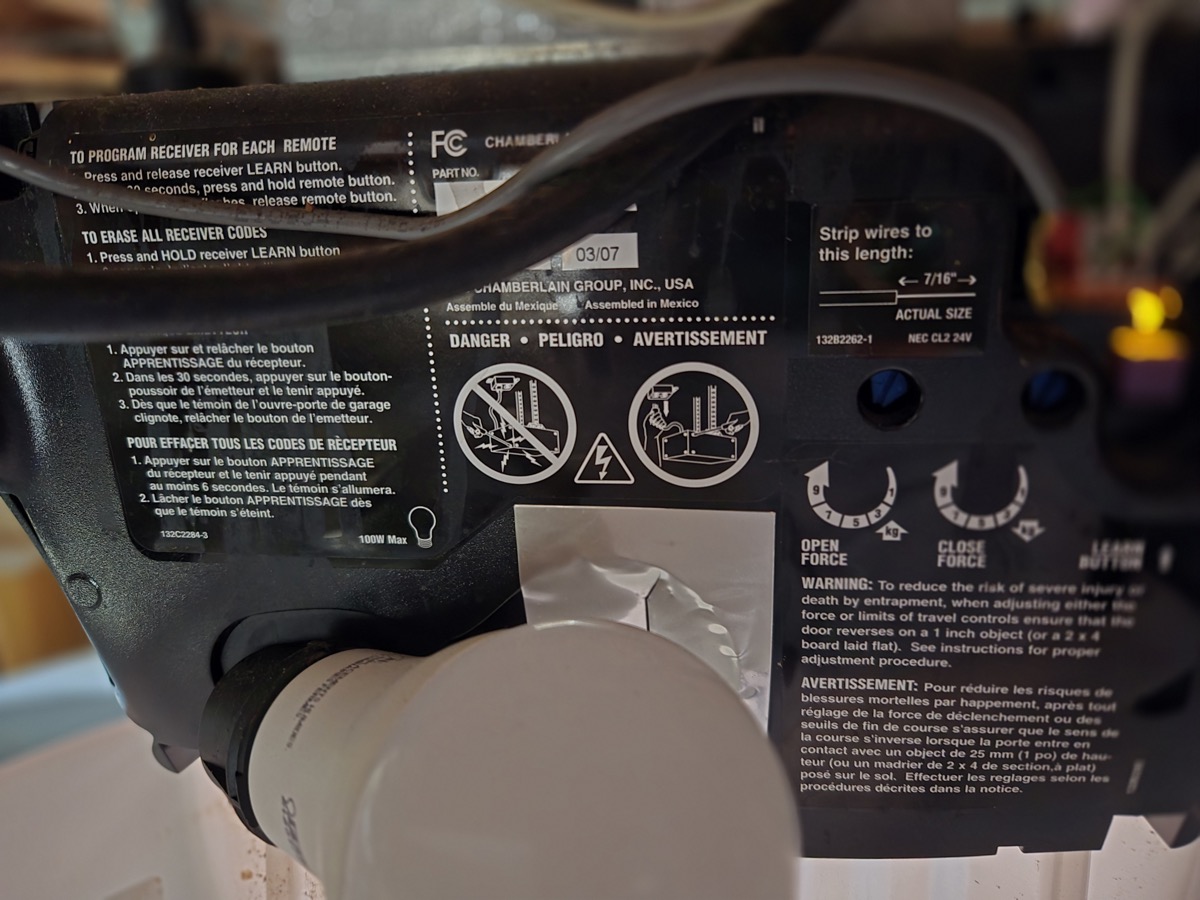
Finding the LEARN Button
Most garage door openers manufactured after 1993 have a LEARN button on the motor unit—that's the box mounted on your ceiling. It's usually located on the back or side of the unit, often near where the antenna wire hangs down. On some models, you may need to remove a light cover to access it. The button might be colored (purple, orange, yellow, or green) or simply labeled.
Programming a New Remote (Single Press)
To add a new remote to your opener's memory, follow these steps:
- Press and release the LEARN button on the opener unit. An LED indicator light will turn on.
- Within 30 seconds, press and hold the button on your remote that you want to program.
- When the opener's lights blink or you hear a click, release the remote button. The remote is now programmed.
You can repeat this process for additional remotes. Most openers can store 4-8 remotes in memory.
Clearing All Remotes From Memory (Long Press)
If you've just moved in, or suspect someone has an unauthorized remote, you'll want to wipe the opener's memory completely. This removes all programmed remotes, keypads, and car-integrated controls:
- Press and hold the LEARN button for about 6 seconds until the LED light goes out.
- Release the button. All remote codes have now been erased.
- Reprogram your own remotes using the single-press method described above.
Security Concerns: Older Openers
If your garage door opener was manufactured before 1993, it likely uses a fixed-code (DIP switch) system. These older units transmit the same code every time, making them vulnerable to a simple attack: thieves with code-grabbing devices can capture your signal and replay it later to open your garage.
Modern openers use rolling code technology (sometimes called hopping code), where the transmitted code changes with every use. This makes code-grabbing attacks virtually impossible.
Smart Garage Door Openers: Convenience vs. Risk
Wi-Fi connected garage door openers and smart controllers (like MyQ, Tailwind, or Meross) let you monitor and control your garage from anywhere. They can send alerts when the door opens, let you grant temporary access to visitors, and even close the door automatically if you forget.
However, any internet-connected device introduces potential security concerns:
- Keep firmware updated. Manufacturers regularly patch security vulnerabilities.
- Use a strong, unique password for your garage door app account.
- Enable two-factor authentication if the app supports it.
- Review connected accounts periodically and remove access for people who no longer need it.
The convenience of smart openers generally outweighs the risks, as long as you follow basic security hygiene. The bigger risk is often the garage-to-house door being left unlocked!
The Bottom Line
Resetting your garage door opener takes less than a minute and gives you peace of mind that only your remotes will work. Remember:
- Single press on the LEARN button to add a new remote
- Long press (6 seconds) to erase all remotes from memory
- Replace pre-1993 openers that use fixed codes
- Secure your smart opener with strong passwords and updates